Experience indexClient concept review // Draft 4.3

CTRL Vault // Six feature storyboards

Every feature earns its place in the story

Six full experience proposals. Each one shows the audience interaction, its screenplay foundation, the system Mirror Factory would build, and the exact production material requested from OtherVRse.

The visual world moves into a brighter cassette-retrofuturist office: institutional, tactile and uncanny - never a boiler room.

A

The Archive

The audience enters through media

The first two features make official screen content tactile. A cassette is selected, played, carried and returned as one persistent object.

01

Screen the story

Approved media feature
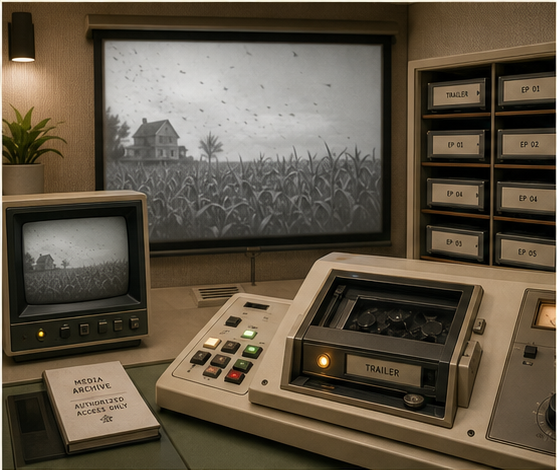
A bright cassette-retrofuturist screening office with a trailer cassette in an analog player and a projected cornfield image

Analog Screening Archive

The official trailer is the first playable cassette. Released episodes appear as physical media over time while unreleased bays remain visibly sealed.

Audience action

Select a cassette, seat it in the transport and operate physical play, pause, rewind and chapter controls.

Story value

The Vault becomes the authoritative home for the film, not a collection of invented missing footage.

What it unlocks

Approved moments can connect to case files, characters and artifacts elsewhere in the Vault.
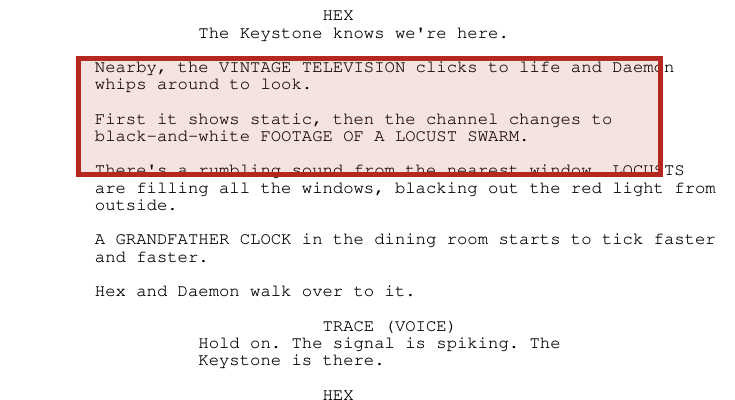
Highlighted screenplay excerpt describing a vintage television showing black-and-white locust footage
CTRL: Locust, Draft 4.3 // screenplay p. 22 // PDF p. 23 // highlight added for review

Screenplay proof

“Nearby, the VINTAGE TELEVISION clicks to life... then the channel changes to black-and-white FOOTAGE OF A LOCUST SWARM.”

Source: INT. LATENT DOMAIN, ANOTHER SERVER - CONT., screenplay page 22.

What the source supports: the film already uses analog television as a story-delivery object. The cassette archive and release schedule are an approved campaign extension, not a screenplay event.

Mirror FactoryInteractive functionality

Mirror Factory builds

  • Physical cassette selection and persistent object state
  • Analog playback, chapter links and release-gated bays
  • Captions, transcripts and keyboard/touch controls

OtherVRseProduction truth requested

Needed from OtherVRse

  • Official trailer and released episode masters
  • Poster frames, captions, transcripts, credits and metadata
  • Approval of chapter-to-case-file connections
02

Carry the case

Proposed physical continuity
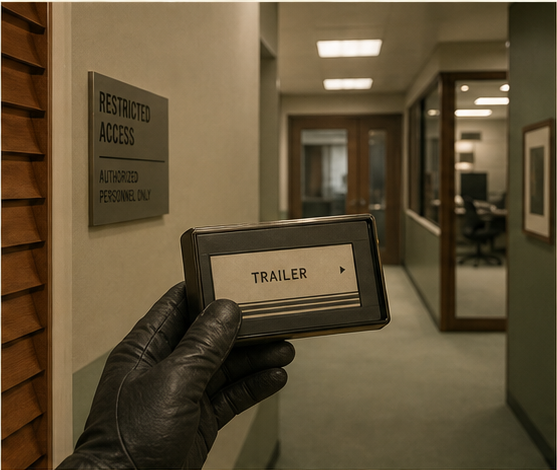
A gloved hand carrying a trailer cassette through a bright restricted retro office corridor

Persistent evidence object

The selected cassette leaves the shelf and travels with the visitor. Later, the recovered Locust drive follows the same physical custody logic instead of becoming an abstract inventory icon.

Audience action

Pick up, carry, insert and return the same object while the environment remembers its location.

Story value

Custody feels procedural and consequential because evidence is always visibly in someone’s hands.

What it unlocks

One reusable hand rig and object-state system can support media, access tiles and the Locust drive.

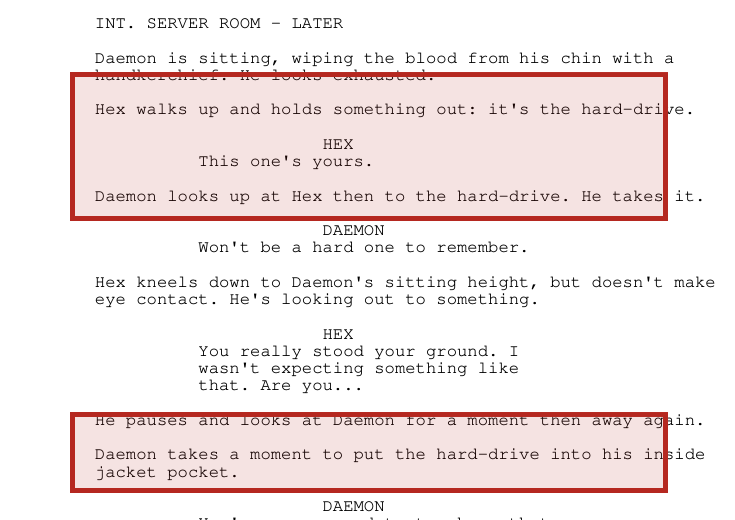
Highlighted screenplay excerpt showing Hex handing the hard drive to Daemon and Daemon carrying it inside his jacket
CTRL: Locust, Draft 4.3 // screenplay p. 28 // PDF p. 29 // highlight added for review

Screenplay proof

“Hex walks up and holds something out: it’s the hard-drive.” Later, “Daemon... put[s] the hard-drive into his inside jacket pocket.”

Source: INT. SERVER ROOM - LATER, screenplay page 28.

What the source supports: the recovered drive has explicit person-to-person custody. The Vault turns that story behavior into a consistent physical interaction language.

Mirror FactoryInteractive functionality

Mirror Factory builds

  • One persistent object instance across rooms and machines
  • Pickup, carry, insertion, ejection and return animations
  • Mobile and non-drag alternatives with visible state
OtherVRseProduction truth requested

Needed from OtherVRse

  • Exact Locust drive dimensions, connectors and wear
  • Reference for Daemon and Hex handling the prop
  • Any approved cassette packaging or physical-media art

Creative boundary: the film supplies the analog media and evidence-custody language. The physical cassette archive is an experience extension using official released content.

B

The Procedure

Access is earned through deliberate action

The middle features transform story protocol into tactile authorization and containment controls without claiming those exact mechanisms appear in the film.

03

Prove authorization

Proposed story procedure
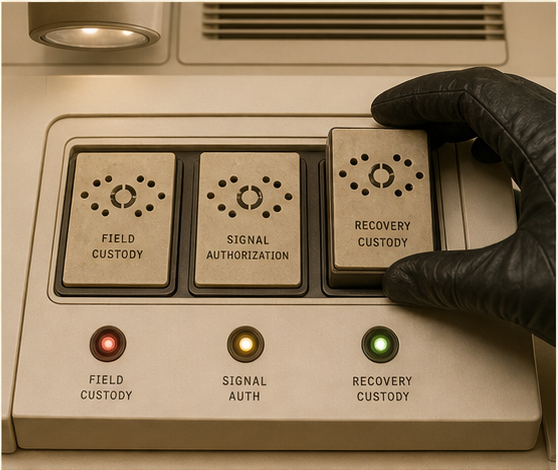
Three authorization tiles being assembled on an ivory analog console with red amber and green status lights

Three-part custody check

Archive discoveries produce three physical authorization tiles. Assembling them confirms that the visitor has followed the case rather than simply finding a password.

Audience action

Locate, carry and seat three uniquely shaped tiles in their matching console positions.

Story value

The action dramatizes that C.T.R.L. is notified for exceptional events and access is procedural.

What it unlocks

The console can release the containment cabinet only after every custody state is physically present.

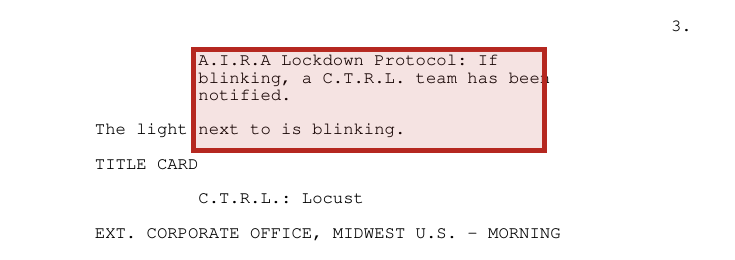
Highlighted screenplay excerpt stating that a CTRL team has been notified by the AIRA lockdown protocol
CTRL: Locust, Draft 4.3 // screenplay p. 3 // PDF p. 4 // highlight added for review

Screenplay proof

“A.I.R.A. Lockdown Protocol: If blinking, a C.T.R.L. team has been notified.”

Source: opening lockdown screen, screenplay page 3.

What the source supports: C.T.R.L. access begins through an A.I.R.A. emergency protocol. The three-tile authorization mechanism is a proposed Vault procedure.

Mirror FactoryInteractive functionality

Mirror Factory builds

  • Three persistent tile states and matching physical slots
  • Readable incomplete, aligned and accepted states
  • Keyboard/touch placement and safe progress checkpoints
OtherVRseProduction truth requested

Needed from OtherVRse

  • Approved A.I.R.A. lockdown screen artwork
  • Any C.T.R.L. access markings or briefing props
  • Story-owner approval of the three-part custody metaphor
04

Open containment

Proposed containment ritual
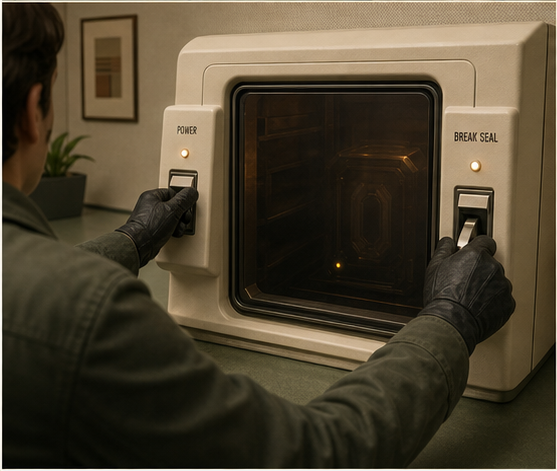
An operator using two physical controls to open a smoked-glass containment cabinet in a cassette-retrofuturist office

Manual two-control release

Two separated controls must be held deliberately to withdraw the cabinet locks. The compact smoked-glass device feels like specialized office equipment, not a rusted vault door.

Audience action

Confirm isolated power, engage both controls and watch the seal retract in a short reversible sequence.

Story value

Opening containment carries the same prepared, equipment-led discipline seen in the field team’s dive procedure.

What it unlocks

The Locust drive becomes physically reachable while the system remains visibly separated from any network.

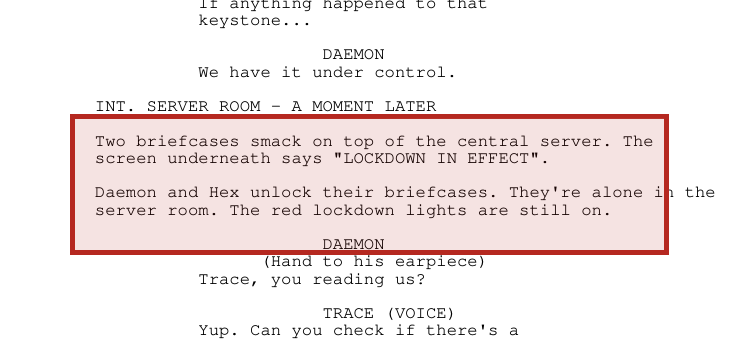
Highlighted screenplay excerpt showing Daemon and Hex placing and unlocking their briefcases under lockdown
CTRL: Locust, Draft 4.3 // screenplay p. 4 // PDF p. 5 // highlight added for review

Screenplay proof

“Two briefcases smack on top of the central server... Daemon and Hex unlock their briefcases.”

Source: INT. SERVER ROOM - A MOMENT LATER, screenplay page 4.

What the source supports: C.T.R.L. operates through deliberate specialist equipment. The two-control cabinet release is a campaign extension informed by that behavior.

Mirror FactoryInteractive functionality

Mirror Factory builds

  • Two-control release with keyboard, touch and pointer input
  • Isolated-power, seal, opening and safe-abort states
  • Cabinet motion, sound cues and reduced-motion equivalent
OtherVRseProduction truth requested

Needed from OtherVRse

  • Dive briefcase hardware, materials and operating details
  • Containment-device references or measured photography
  • Approval of warnings, handling logic and reveal timing

Creative boundary: the exact tiles and cabinet controls are not screenplay facts. They translate the story’s emergency notification, specialist kits and containment behavior into audience actions.

C

The Locust Drive

The experience arrives at the canonical object

The final two features use the extracted drive and containment ending directly. The visitor encounters one Locust object, not two creatures or two instances.

05

Recover the drive

Direct story object
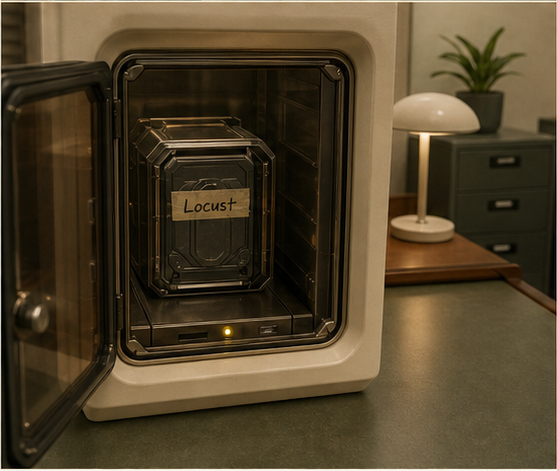
A rugged hard drive labeled Locust revealed inside a bright smoked-glass containment cabinet

Extraction payoff

The cabinet reveals the exact dramatic object audiences saw extracted from the latent domain: a rugged drive that can be carried from containment to Channel 18.

Audience action

Inspect the drive, its handwritten label, connector orientation and unresolved yellow signal before removing it.

Story value

The interactive journey pays off with a real screenplay object rather than a generic key or invented creature.

What it unlocks

Removing the drive starts the continuous transition into the contained Channel 18 session.

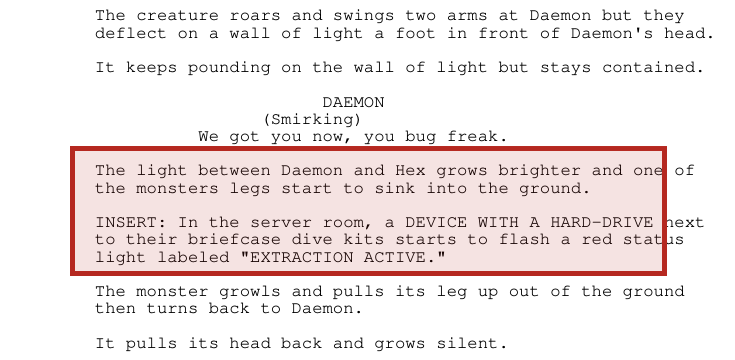
Highlighted screenplay excerpt describing an extraction device with a hard drive flashing an extraction active status
CTRL: Locust, Draft 4.3 // screenplay p. 26 // PDF p. 27 // highlight added for review

Screenplay proof

“A DEVICE WITH A HARD-DRIVE next to their briefcase dive kits starts to flash a red status light labeled ‘EXTRACTION ACTIVE.’”

Source: extraction climax, screenplay page 26.

What the source supports: the hard drive is the physical result of the Blizzard extraction. The Vault reveal preserves that cause-and-effect.

Mirror FactoryInteractive functionality

Mirror Factory builds

  • Inspectable web-ready drive and cabinet derivatives
  • Extraction-state light, reveal animation and object pickup
  • Persistent drive state into the Channel 18 transition
OtherVRseProduction truth requested

Needed from OtherVRse

  • Extraction device and hard-drive models, scans or turnarounds
  • Exact status-light behavior, connectors and scale
  • Approved label, wear and prop-handling reference
06

Contain the contact

Approved continuous feature
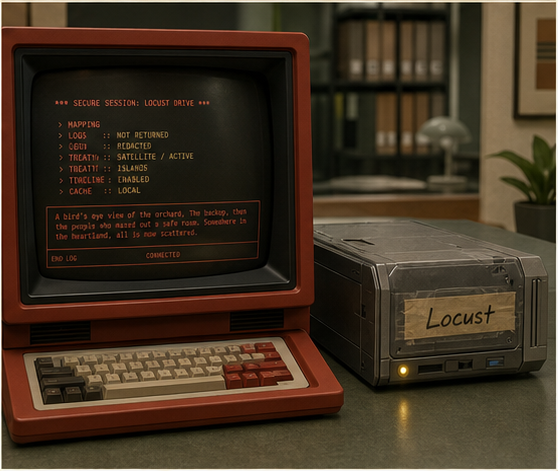
The same Locust hard drive mounted beside a red CRT computer in a bright cassette-retrofuturist office

Channel 18 air-gapped session

The same recovered drive is mounted beside Channel 18 for a curated conversation. A physical cutoff reseals it; the final yellow blink remains unresolved.

Audience action

Mount the drive, choose bounded prompts, observe its attempts to influence the operator, then manually terminate and reseal.

Story value

The danger is not an open chatbot. It is one contained presence trying to turn a human into its bridge outside.

What it unlocks

Responses can change only approved case-file states while preserving one authored story boundary.

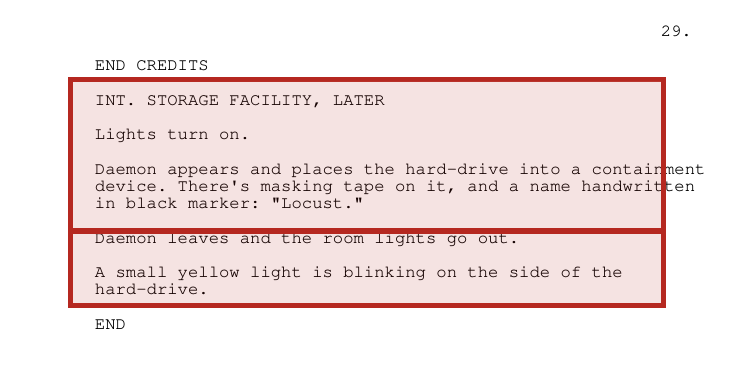
Highlighted screenplay ending showing the hard drive labeled Locust inside containment and a blinking yellow light
CTRL: Locust, Draft 4.3 // screenplay p. 29 // PDF p. 30 // highlight added for review

Screenplay proof

“Daemon... places the hard-drive into a containment device... a name handwritten in black marker: ‘Locust.’” Then, “A small yellow light is blinking.”

Source: INT. STORAGE FACILITY, LATER, screenplay page 29.

What the source supports: containment, the Locust label and the unresolved yellow blink are canonical. The curated conversation is an approved experience extension using that same drive.

Mirror FactoryInteractive functionality

Mirror Factory builds

  • Bounded prompt-and-response session on Channel 18
  • Visible air gap, volatile session state and physical cutoff
  • Transcript, manual reseal and remembered yellow-blink ending
OtherVRseProduction truth requested

Needed from OtherVRse

  • Final containment device and storage-facility reference
  • Canon-approved Locust response script and reveal limits
  • Voice/performance assets if the contained presence speaks

Asset status: every OtherVRse line is a focused production request, not a claim that web-ready assets have been delivered. Generated visuals are concept art and are not production stills.

Storyboard concept visualization